Quick start
From docker run to OTP verification, failure handling, and Twilio integration. Every command below runs as written against a fresh container.
-
Run it
Run the SMS mock container in Docker. In this repository, the root
make upbrings it up together with the Asaas mock, the generator and Mailpit;make up MOCKS=smsstarts only the SMS mock.docker run --rm -p 127.0.0.1:8899:8899 ghcr.io/instituto-ama/sms-mock:latestThe mock listens on port
8899. Verify that the server is ready:curl http://localhost:8899/health{ "status": "ok", "service": "sms", "version": "0.2.0" } -
Open the panel
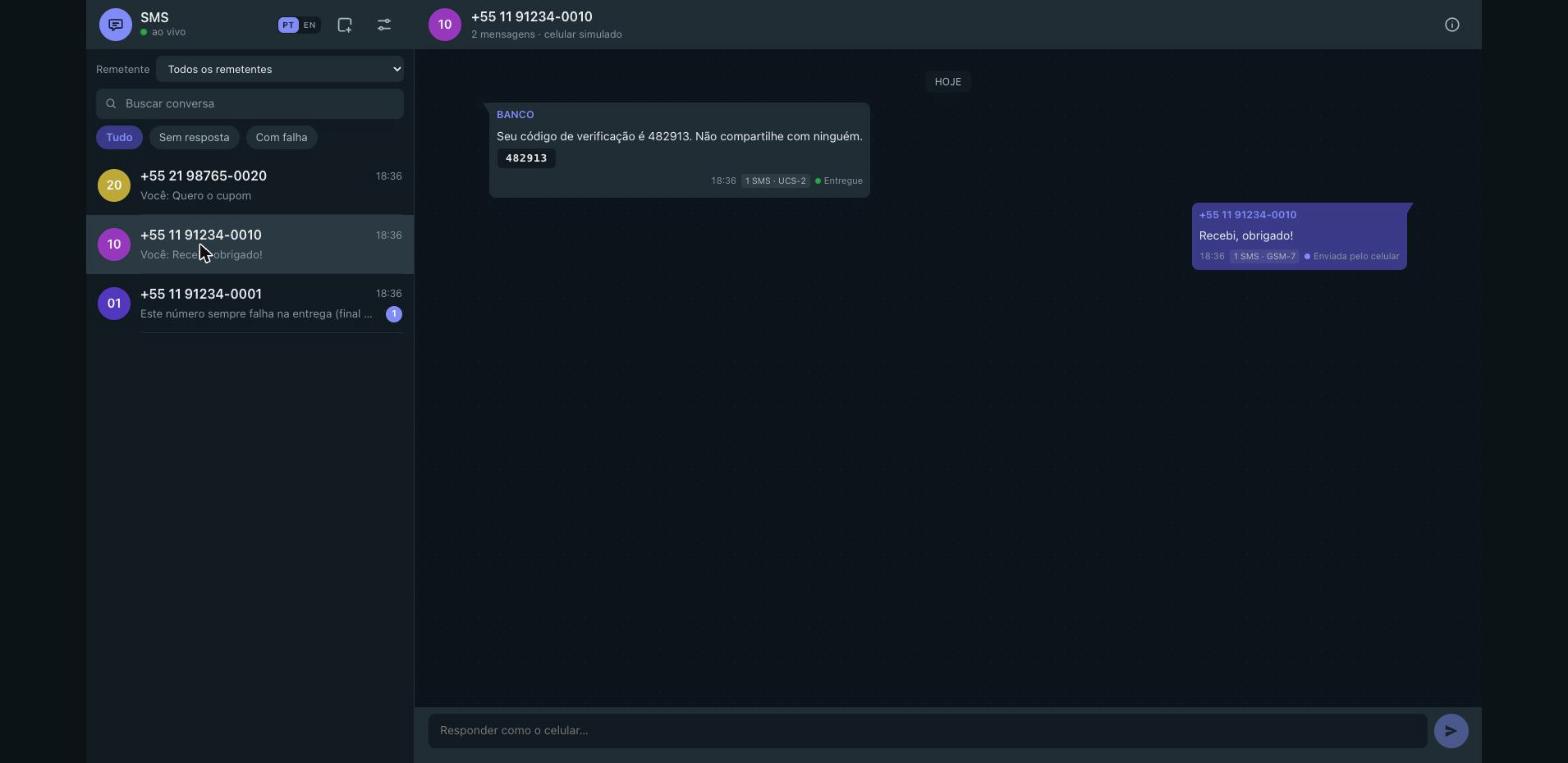
Open http://localhost:8899 in your browser. The panel is the handset: the SMS your application sends arrive as the bubbles on the left, with the sender id, the chip that copies the verification code, the segment count and the status (queued, sent, delivered, undelivered, failed). What you type in the composer is what the handset sends: it arrives as the bubble on the right and fires the inbound webhook. The details drawer — the info icon, or a click on a bubble — shows the fields of the message, its JSON and its status history. The panel opens in Brazilian Portuguese; the PT|EN switch in the header changes the language.
The empty state offers Nova mensagem de teste (new test message: it goes through the API, the way your application would send it), Carregar exemplos (load the samples) and Abrir painel de controle (open the control panel, with the delivery, webhook, event, magic-number and API tabs). To seed the sample conversations from the command line:
curl -X POST http://localhost:8899/_mock/sms/demo -
Send an SMS
Send an outbound SMS using the native REST API to
+5511912340010. The mock parses the message body, detects GSM-7 or UCS-2 encoding, calculates segments, extracts OTP codes, and places the message inqueuedstatus:curl -X POST http://localhost:8899/v1/messages \ -H 'Content-Type: application/json' \ -d '{ "to": "+5511912340010", "body": "Your authentication code is 849201", "from": "AUTH" }'{ "id": "SM9f2c4e1b7a3d48c5b06e1d2f93a7c8b4", "direction": "outbound", "from": "AUTH", "to": "+5511912340010", "body": "Your authentication code is 849201", "status": "queued", "api": "native", "encoding": "GSM-7", "segments": 1, "codes": [ "849201" ], "errorCode": null, "errorMessage": null, "callbackUrl": null, "createdAt": "2026-10-29T21:00:00.000Z", "updatedAt": "2026-10-29T21:00:00.000Z", "sentAt": null, "deliveredAt": null, "history": [ { "status": "queued", "at": "2026-10-29T21:00:00.000Z" } ] }By default (
SMS_AUTO_DELIVER=1), the message automatically transitions tosentafter delay/3, then todeliveredafterSMS_DELIVERY_DELAY_MS(default 1500 ms). -
Read it back
Query messages for a given phone number. In automated tests, pass
wait=5000to wait up to 5 seconds for a match: it answers at once when one exists; addstatus=deliveredto wait for the delivery:curl 'http://localhost:8899/v1/messages?to=%2B5511912340010&wait=5000'{ "messages": [ { "id": "SM9f2c4e1b7a3d48c5b06e1d2f93a7c8b4", "direction": "outbound", "from": "AUTH", "to": "+5511912340010", "body": "Your authentication code is 849201", "status": "delivered", "api": "native", "encoding": "GSM-7", "segments": 1, "codes": [ "849201" ], "errorCode": null, "errorMessage": null, "callbackUrl": null, "createdAt": "2026-10-29T21:00:00.000Z", "updatedAt": "2026-10-29T21:00:01.500Z", "sentAt": "2026-10-29T21:00:00.500Z", "deliveredAt": "2026-10-29T21:00:01.500Z", "history": [ { "status": "queued", "at": "2026-10-29T21:00:00.000Z" }, { "status": "sent", "at": "2026-10-29T21:00:00.500Z" }, { "status": "delivered", "at": "2026-10-29T21:00:01.500Z" } ] } ], "count": 1 } -
Reply as handset
Simulate the handset user replying to your outbound SMS. Inbound messages have
direction: "inbound"andstatus: "received", update the conversation thread in the panel in real time, and dispatch an inbound webhook if configured:curl -X POST http://localhost:8899/_mock/sms/inbound \ -H 'Content-Type: application/json' \ -d '{ "from": "+5511912340010", "body": "CONFIRMAR" }'{ "id": "SM1d7e5a0c93b248f6a8e4c2b7f06d31a9", "direction": "inbound", "from": "+5511912340010", "to": "AMA4DEVS", "body": "CONFIRMAR", "status": "received", "api": "mock", "encoding": "GSM-7", "segments": 1, "codes": [], "errorCode": null, "errorMessage": null, "callbackUrl": null, "createdAt": "2026-10-29T21:00:05.000Z", "updatedAt": "2026-10-29T21:00:05.000Z", "sentAt": null, "deliveredAt": null, "history": [ { "status": "received", "at": "2026-10-29T21:00:05.000Z" } ] } -
Trigger a failure
Test error handling deterministically by sending to numbers with specific endings. Sending to a number ending in
0001produces a delivery failure with error code30003:curl -X POST http://localhost:8899/v1/messages \ -H 'Content-Type: application/json' \ -d '{ "to": "+5511912340001", "body": "Delivery failure simulation" }'Magic number suffixes supported:
0001— Delivery failure (transitions tofailedwith error30003)0002— Undelivered handset (transitions toundeliveredwith error30005)0003— Immediate rejection at submission (HTTP 400rejected_number/ Twilio code21211)0004— Stuck indefinitely insentstatus0005— Filtered by carrier spam protections (statusfailedwith error30007)
-
Point Twilio client
Integrate with existing Twilio applications without changing SDK calls. Point your Twilio client to
http://localhost:8899or submit standard form requests:curl -X POST http://localhost:8899/2010-04-01/Accounts/ACmock/Messages.json \ -u ACmock:mocktoken \ -d "To=+5511912340010" \ -d "From=AMA4DEVS" \ -d "Body=Testing Twilio compatibility"{ "sid": "SM6b0a8f3e2c7d41958e1f4a2d9c3b7e05", "account_sid": "ACmock", "api_version": "2010-04-01", "body": "Testing Twilio compatibility", "date_created": "Thu, 29 Oct 2026 21:00:00 +0000", "date_updated": "Thu, 29 Oct 2026 21:00:00 +0000", "date_sent": null, "direction": "outbound-api", "error_code": null, "error_message": null, "from": "AMA4DEVS", "to": "+5511912340010", "num_segments": "1", "num_media": "0", "price": null, "price_unit": "USD", "status": "queued", "messaging_service_sid": null, "uri": "/2010-04-01/Accounts/ACmock/Messages/SM6b0a8f3e2c7d41958e1f4a2d9c3b7e05.json", "subresource_uris": { "media": "/2010-04-01/Accounts/ACmock/Messages/SM6b0a8f3e2c7d41958e1f4a2d9c3b7e05/Media.json" } } -
Turn it off
The SMS mock stores all messages, conversations, and webhook logs in memory. Stop the container with
Ctrl+Cordocker stop; restarting provides a completely clean slate.